
Content Strategy | 101
When we discuss the distribution, delivery, design and development of how to built apps, web products and digital solutions with our clients and contributors. It is always important to explain our company culture along with our preferred call to action method behind the nature of web design.
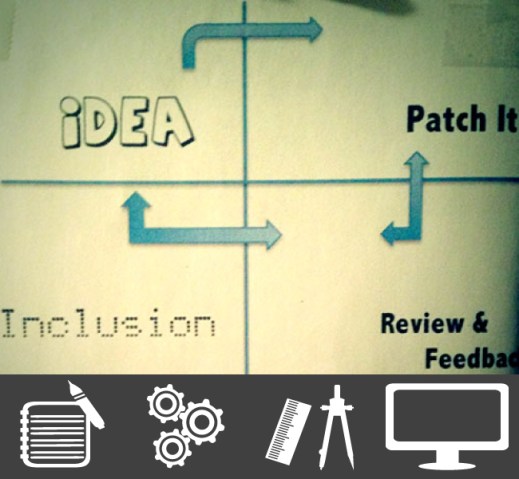
- Brainstorm
- Design
- Test
- Publish
- Iterate
The Brainstorming Process
I once had the pleasure of working with a brilliant entrepreneur who would begin our meet ups by drawing flow charts on a small drawing pad using a red ball point pen. He would then instruct me to create web design mockups based on his detail paper doodles. Working with Jin, gave me a valuable experience in understanding how things come into being. In realizing the connection between technology, design, art, and the interconnected notion of thinking about how the end user will interact with our applications. For us, brainstorming involves the organization of ideas about discovering an efficient calls to action.
What Is A Call To Action?
Paul Boag, describes this in glorious detail, in a wonderful blog post which I highly recommend worth reading. For us, we begin by asking the client what are the most important selling points or driving R.O.I behind their idea. In relation to what they expect or want the user to act upon. In thinking about first, second and third actions to perform by the user within the confines of the application or web site. We then edit or modify our investigatory solutions which will often go through several paper compositions in combination with mood boards. Usually it only takes two or three meet ups to zero in on a paper comp which contains all the necessary ideas we will need before getting started with design and code.
The brainstorming process might also include a platform delivery roadmap as a way of thinking about app revenue. We think is best practice to create a web version of the product first. As a means of generating early users who will provide valuable feedback as other components are built and updated over time. For our upcoming Line On Paper magazine, we created a web app which is available on the web as a launching issue entitle “the beta issue”. With subsequent issue updates coming in the form of an iOS app allowing our subscribers the ability to create and distribute their own DIY projects inside the app.
Design For The Web
We often think really hard about which set of tools are best suited for creating meaningful startups online. And as a company ( CTTDC ) we often draw a line in the sand when we discuss the importance of designing with usability in mind. Our focus is a passion for working within the creative/DIY working group while creating a web base portfolio that is candidly original. When we began working on The Art Of Sylvia O, our brainstorming comps allowed us to create a static PSD site map in conjunction with a corresponding HTML/CSS web prototype.
Sylvia, a life long friend and creative colleague wanted a simple, effective and customizable web site to exhibit her paintings in a way that reflected her values as an artist. FB, Twitter, Square Space and Tumblr are not always effective tools for professional portfolio showcase. We always recommend using WordPress as the only digital publishing solution for obvious reasons. We don’t need to persuade you as to why WP is the right choice for your publishing needs other than the majestic 18+% of the world web traffic and projects which have been created using the open source platform.
The basic idea behind how we design our digital services for the web originates from thinking about our barnstorming notes as visual metaphors for the placement of content. The design process is then applied by focusing on developing a clear blueprint with a strong sense of user call to action baked right in. Our designs will keep the focus on functionality as we work with our contributors in optimizing the content delivery mechanism of the app.
Sylvia’s site contains a sophisticated server side back end built and modified using a child theme concept entirely using WordPress which will allow her, the ability to login, edit and change content as she sees fit while keeping things organized. Designing modern web sites these days means the ability to understand the complexities behind implementing a “mobile first” approach which is closely approximated within a responsive design workflow.
Bult A Testing SandBox
MAMP (Mac Only) stands for my Mac, Apache, MySQL and PHP, thus allowing the front end designer the ability to run a local testing server environment running on your computer.
MAMP installs a local server environment in a matter of seconds on your Mac OS X computer, be it MacBook or iMac. Like similar packages from the Windows- and Linux-world, MAMP comes free of charge, and is easily installed. MAMP will not compromise any existing Apache installation already running on your system. You can install Apache, PHP and MySQL without starting a script or having to change any configuration files! Furthermore, if MAMP is no longer needed, just delete the MAMP folder and everything returns to its original state (i.e. MAMP does not modify any of the “normal” system).
–The MAMP Team
We love using MAMP to develop the look and feel of a web site, apps and plugin widgets as a vital step one before porting the project to a live server and for delivering version control instances of the app when distributing comps to a client. Local development often refers to the process of building web sites, applications and server side logic from the comfort of a virtual server. This process grants us the ability to run PHP and MySQL without being connected to the internet in order to run and test your apps. One of the most annoying parts of web development, at least for me, is the constant cycle of edit, save and refresh. Which depending on bandwidth and traffic can turn a menial task into an extensive project.
With application platforms such as WordPress, which require a server back end to work, you would normally be constrained to develop on a live server, with the headaches that go along with this. MAMP and its Windows counterpart, WAMP, are tools that allow you to locally develop applications that require a server on the back end. And overtime, you can begin to export your application to a live production server for optimal ease of use. From a purely development spectrum, working within a sandbox is an ideal situation as we are free to experiment, brake things and put them back together.
In order to work with MAMP, we must first obtain it. Head over to the project page and download the disc image and double click to begin the install and you will be presented with a choice: Both MAMP and MAMP Pro come in the same download and you will need to install only one in able to get started. For most scenarios, MAMP is more than adequate but the PRO version offers more options such as a having a virtual local DNS server on top of the already PHP/MySQL stack. Drag the MAMP folder onto the “Application” shortcut and the install will get underway.
Our good friends Lucid Nerd and Justin Jonda, provides a wonderful tutorial on how to get started using MAMP:
Web Publishing | A Case Study
Every project begins with an idea. The end result of someone wanting to get something publish on the web, be it for personal or commercial ends. Before we commit to a long process of writing a press release along with finalizing our publishing needs, we ask ourselves a few questions as a method of investigating if the desired calls to action for the project have been meet. For Line On Paper magazine, we began to think about the following criteria as a way of determining the usefulness of the project. We like to think of this phase of the site planning as a final check list to see if all the components are optimal for our target audience.
Publishing Strategy
- Why are we publishing this web site? What do we expect to accomplish?
- What do you want users to do once on the web site?
- What will bring visitors back?
Target Audience
- Who is the primary audience?
- How often do we expect them to interact with our product or service? How long will they stay during an average visit?
Content
- Who is responsible for generating original content?
- How will content be submitted (process or format)?
- How often will the information be updated (daily, weekly or monthly?
When we create digital assets for clients, we immediately begin to establish who will be responsible for generating the content that goes on the site, app or product. Some clients arrive full circle with their ideas but empty-handed, assuming that we will create a web site and the content in it. Ideally, the client or contributor is responsible for generating its own content and will allocate the appropriate resources to do so. Solid copy writing is an important consideration during our initial quality assurance phase.
A good idea is to move the app into a live production server prior to publishing and iterating. In the past we have stumble upon an interesting “bug” when using MAMP in that the site will appear fine when tested locally, but once on the live server, a few links and images are often missing. This is due to the pretty permalink structure within WP and can easily break the aesthetic of your presentation. Thus, post-publishing make sure to test a few parameters as a basic quality check before delivery:
Is All The Content There:
- Make sure that none of your content is missing, whether as the result of a markup glitch or bad copy writing
Are There Typos Or Grammar Errors?
- The importance of proofreading a site is often overlooked but errors in copy can seriously damage the perceived credibility of any online project. Make sure all copy is read carefully, preferably by more than one person.
Do all The Links Work?
- Its very easy to leave links un-linked during the production process. It is also possible that some files may have been moved around but the links were not updated as often the case when porting from local to production server.
- Before we go live, we will literally check every single link on every instance just to make sure there are no dead ends. Confirm that all images, video, graphic files are in the proper directory and correct pathnames is used in the
elements to avoid missing image icons.
Iteration Model
Iteration is defined as the process of maintaining, updating and adding service side features to your application, web site or any other digital asset:
The repetition of a process or utterance.
Repetition of a mathematical or computational procedure applied to the result of a previous application, typically as a means of obtaining successively closer approximations to the solution of a problem.
A new version of a piece of computer hardware or software.
We recently completed a relatively small project for a real estate firm in NJ, where the iteration model post-publishing consisted in training agents on how to use the web site to fit their needs. The goal for our clients (whom did not want to be named for the essay) consisted in developing a CMS backend where brokers could update/modify their listings using their phone. We designed a custom management system using WordPress, with both a desktop and iOS component. We worked on the desktop version first and ported the content to the app afterwards. The user experience scenario for the project was structure around three main areas:
- CMS content modifications
- iOS development using AppPresser
- Training
The challenge was to create a desktop mobile web app (Content Management System) which contained a backend database to store user content information. Allowing each broker the ability to make content modifications as they see fit. The iOS app had to work in unison with the desktop version in terms of design and performance. We decided to work with AppPresser for developing the iOS component. Agents could launch the iOS or Android app, login and check whether new listings became available, upload/modify photos and even submit rent applications using the built in form control features of the app, while on the road.
The ideal solution for a client who does not want to modify a web site using code base tools nor has the budget to hire a large web development team to do so is to create a tailored content management system. Our approach to project iteration, consulting and training is composed from gathering detail information during our initial brainstorming process with the client. Then, we create a robust training strategy which is focused on each software component and begin to assess which team member will be responsible for modifying the content.
Next Steps
We are experienced web designers with skills in front end development and UX story telling. Our approach to web design is culled from taking on creative projects while maintaining a passion for art, design and DIY social communities. Our current portfolio structure is always evolving, as with the nature of the web.
https://twitter.com/socialconceptdc/status/470723456531963904
Iteration strategies is a major role to consider these days.
- Front End Development
- WordPress
- Content Management Software Systems
- Web Design
- Back End Programming: PHP/MySQL
- iOS
- Consulting
- Technology Concierge Services
Hire Us,


 Arts Journal Zine
Leave a comment